Samsung Water Filter Light Won’t Reset? Fix by Panel Type
You installed a new filter and the light is still red. Samsung uses a different reset for each control panel design, so a method meant for another panel is the most common reason the light won’t clear. Once you know which panel you have, the reset takes under a minute.
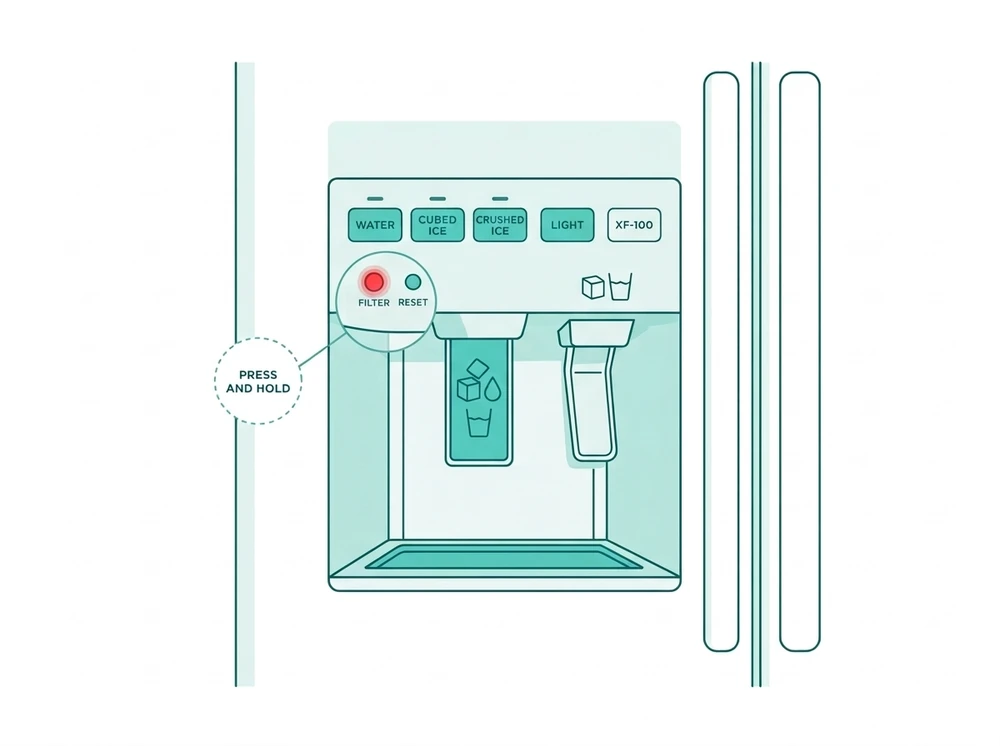
Step 1: Identify Your Panel Type
Samsung has shipped several dispenser panel designs, and each generation runs its own control-board firmware with its own reset method. Match your fridge’s control panel to one of these:
- Standard button panel: a physical “Filter Reset” button on the dispenser or control panel, usually next to the ice and water buttons. No screen.
- Family Hub touchscreen: the large tablet-style screen on Family Hub models, where you use on-screen apps instead of buttons.
- Arrow-button panel: a smaller LED or LCD display with physical arrow and menu buttons, common on mid-range models.
- RF4289 / RSG309 series: older French-door models with their own Settings menu, different from the newer arrow-button layout.
Not sure? A touchscreen means Family Hub, a menu with arrow keys means arrow-button, a single reset button means standard, and an older Settings list means RF4289/RSG309. If you still can’t tell, try the standard button first. It’s the most common panel and takes a few seconds to rule out.
Step 2: Follow the Matching Reset Sequence
Standard panel models: Press and hold the “Filter Reset” button for 3 seconds. A chime sounds and the indicator changes from red to blue or green. If you let go before the chime, the reset didn’t register, so hold it a little longer.
Family Hub models: Go to Apps → Fridge Manager → Fridge Settings → Water Filter → Reset. This panel doesn’t chime. Check that the on-screen filter status updates instead.
Arrow-button models: Use the arrow buttons to reach “More Options,” then select Filter Reset. The display should return to the main screen with the filter indicator cleared.
RF4289 / RSG309 models: Go to Settings → Water Filter, then hold Reset until the status changes. This older menu is easy to confuse with the newer arrow-button layout. If these steps don’t match your screen, you probably have the newer panel.
Common Mistakes When Resetting the Filter Light
- Using the wrong panel’s method. This is the most common issue. A Family Hub sequence does nothing on a standard button panel, and the other way round.
- Not holding the button long enough. On standard panels a quick tap doesn’t register. Hold for the full 3 seconds, until the chime.
- Expecting the light to clear by itself. Swapping the cartridge doesn’t reset the counter on any Samsung panel. You have to run the reset every time.
- Giving up after one try. If the first attempt doesn’t clear it, a power cycle (below) fixes most of the remaining cases.
Step 3: If the Light Stays Red After a Correct Reset
Unplug the refrigerator for a few minutes, plug it back in, then run the reset for your panel type again. If the light still won’t clear, the sensor or panel is probably faulty. Contact Samsung support with your model number instead of repeating the reset. If the fridge is under warranty, a panel or sensor fault is typically a covered repair.
Check that you’re using a genuine or verified-compatible HAF-QIN filter. The wrong cartridge size can also make the panel misread the reset. Check compatibility on the Samsung HAF-QIN Compatibility Finder.
Compatible replacement: the Swift Green Filters SGF-HAFQIN is sold as a compatible replacement for the HAF-QIN and DA97-17376B (View SGF-HAFQIN →). If your fridge takes the HAF-CIN or DA29-00020B, the SGF-DA20B is sold for those (View SGF-DA20B →). Affiliate links: we may earn a commission at no cost to you.
- Samsung Refrigerator Water Filter Compatibility Finder: confirm you have the right filter installed
- Samsung Refrigerator Water Filter Bypass Plug: an option if the reset light problem comes from a missing filter
Frequently Asked Questions
Why does my Samsung fridge have a different reset method than what I found online?
Samsung has shipped at least four dispenser panel designs, each with its own firmware and reset sequence, so a guide written for one panel won’t work on another. A single Filter Reset button means the standard panel. A large tablet-style screen means Family Hub. A smaller LED or LCD display with arrow keys means the arrow-button panel. An older Settings list on a French-door model points to the RF4289 or RSG309 series. If you’re unsure, try the standard button method first.
Do I need to reset the light every time I change the filter?
Yes, every time. On Samsung models the light runs off a counter in the panel, and the fridge can’t sense that a new cartridge went in. Until you run the reset, it keeps counting and keeps showing the warning. GE’s RPWFE system works differently: it reads an RFID chip and clears on its own, so advice for one brand doesn’t carry over to the other. Skipping the reset doesn’t stop the new filter working. It only leaves the warning on and the counter running from the wrong date.
Is a stuck red light a sign my new filter is defective?
Usually not. The light runs off the panel’s counter, not a sensor that checks the cartridge, so it can’t tell whether your filter is good, bad or genuine. A light that stays red nearly always means the reset didn’t register, most often because the method was for a different panel. Run the sequence for your panel and watch for its confirmation: a chime and a color change on the standard panel, or an updated on-screen status on the menu panels. If the light stays on after a correct reset, the panel or its sensor is the problem, and another new cartridge won’t help.
How long should the reset actually take?
A few seconds on every panel. The standard button panel needs a 3-second hold, and letting go early is a common reason it fails. Hold until you hear the chime and the indicator changes from red to blue or green. On the menu panels (Family Hub, arrow-button, RF4289 or RSG309) it takes as long as navigating to the Water Filter entry and selecting Reset. If you’re holding a button far longer than 3 seconds or repeating a menu path, check you have the sequence for your exact panel. If the right sequence still doesn’t clear it, try the power cycle in Step 3 above.
What if I don’t hear a chime when I reset?
That’s normal on every panel except the standard button type. Only the standard panel chimes, along with the indicator changing from red to blue or green after a 3-second hold. Family Hub, arrow-button and RF4289 or RSG309 models show the reset on screen instead: the filter entry flips from used or overdue back to new. If you’re on a standard button panel and hear no chime, you most likely let go too early.
Source: Samsung official support: replacing the water filter in a Samsung refrigerator.