Shark Vacuum Roller Not Spinning? Here’s How to Fix It
If your Shark vacuum powers on but the brush roll won’t turn, there are four likely causes, and three of them are fixable in under ten minutes with no replacement parts. In rough order of how often they happen: hair or debris wrapped around the roller, a floor-type setting that switches the brush roll off on hard floors, a worn or snapped drive belt, and a fault in the wand connection or the handle’s internal microswitch. Tangled debris accounts for the majority of cases and should always be checked first, because a jammed roller can also trip a protection circuit that stops the motor entirely. The floor-setting check takes seconds and costs nothing. A drive belt is the only one of the four that normally needs a replacement part. Work through them in the order below and stop as soon as the roller turns freely again.
- Tangled hair or debris — most common, no parts needed
- Floor-type setting — seconds to check, no parts needed
- Worn or broken drive belt — needs a genuine Shark replacement belt
- Wand connection or internal switch fault — may need support
If your model has a red/green indicator light on the nozzle and it’s currently red, see our guide to what a red brush-roll light specifically means for the airflow/filter cause most guides skip.
Safety First
Turn off and unplug the vacuum (or remove the battery on a cordless model) before checking or clearing the brush roll by hand.
Cause 1: Tangled Hair or Debris (Most Common)
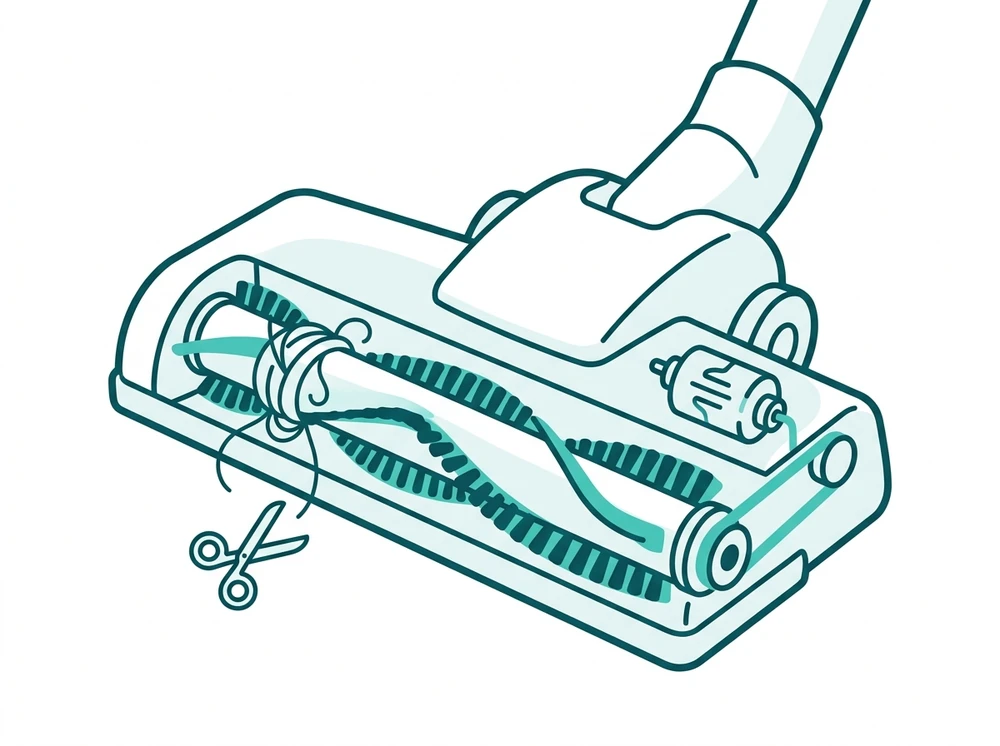
Hair, string, or large debris wrapped around the brush roll is the most common cause — it can force the roller to seize or trip a built-in protection circuit that stops it from spinning entirely.
- Unplug the vacuum or remove the battery.
- Turn the floor head over and look along the full length of the brush roll, including both ends where hair collects around the bearings.
- Use scissors to carefully cut away hair and threads wound around the roller.
- If your model has a removable floor plate, unscrew or unlock it, lift the brush roll out, and clean the bearings underneath.
- Spin the roller by hand. It should turn freely with no resistance.
- If it still won’t turn once it looks clear, the clog hasn’t been fully removed — check again before moving on.
Cause 2: Floor-Type Setting
Some Shark models disable the brush roll automatically on a “bare floor” or “hard floor” setting. Before assuming a mechanical fault, confirm the floor-type switch is set to carpet or auto mode.
- Find the floor-type selector on the handle, body, or floor head, depending on your model.
- Switch it to carpet or auto rather than bare floor or hard floor.
- Power the vacuum back on and check whether the roller now turns.
Cause 3: Worn or Broken Drive Belt
The rubber belt that connects the motor to the brush roll can stretch, melt, or snap over time. This is the point where a fix typically requires a replacement part rather than just cleaning.
- Unplug the vacuum and turn the floor head over.
- Remove the screws holding the sole plate on the underside of the floor head.
- Lift the plate away and inspect the belt where it wraps the roller and the motor shaft.
- If the belt is visibly stretched, glazed, melted, or snapped, replace it with a genuine Shark belt for your model number.
Belt problem or just debris? How to tell them apart
| Check | Tangled debris | Worn or broken belt |
|---|---|---|
| Turning the roller by hand | Stiff or seized until the hair is cut away | Spins freely, often with no resistance at all |
| What you can see | Hair, thread, or carpet fibre wound at the roller ends | Belt stretched, glazed, melted, or snapped in two |
| Burning rubber smell | Uncommon | Common, especially if the belt has been slipping |
| Does it help to clean it? | Yes — roller turns again once fully clear | No — cleaning changes nothing |
| What it takes to fix | Scissors and a few minutes | A genuine Shark replacement belt for your model |
Cause 4: Wand/Hose Connection or Internal Switch Fault
Dust buildup or a broken connection inside the wand or hose can cut off the power that drives the floor head’s motor. Upright models also rely on an internal microswitch that only engages the brush roll when the handle is tilted back into the operating position.
- Detach the wand and connect the handle (or pod, on a stick vacuum) directly to the floor head.
- Power it on. If the brush roll spins this way, the fault is in the wand or its connection pins, not the roller itself.
- Check the wand’s connection pins for dust buildup or visible damage and clear them.
- On an upright, tilt the handle fully back into the operating position and listen for the roller engaging. If it never engages, a worn internal microswitch is the likely cause and needs support.
When to Contact Shark Support Instead of DIY
A broken belt or a faulty internal switch usually means opening the unit further than a quick clean requires. If the vacuum is still under warranty, or you’re not comfortable disassembling the floor head, it’s worth contacting Shark support with your model number rather than continuing to take it apart.
A stuck roller is usually a mechanical issue, not a filter one — but if it turns out weak pickup is coming from a worn filter as well, check your model against our Shark vacuum filter compatibility guide.
Frequently Asked Questions
Why did my Shark vacuum roller suddenly stop spinning?
Tangled hair or debris wrapped around the brush roll causes the majority of sudden stoppages, so clear that first. A jammed roller can also trip a built-in protection circuit that shuts the motor down entirely, which makes the problem look mechanical when it isn’t. Unplug the vacuum or remove the battery, turn the floor head over, and look along the full length of the roller, including both ends where hair collects around the bearings. Cut the hair and threads away with scissors, then spin the roller by hand; it should turn freely with no resistance. If it still will not turn, the clog has not been fully removed, so check again before going further. Only once the roller is genuinely clear should you consider the other three causes: a floor-type setting that switches the brush roll off on hard floors, a worn or snapped drive belt, or a fault in the wand connection or handle microswitch.
Does the floor-type setting affect the brush roll?
Yes. Many Shark models switch the brush roll off automatically when the floor-type selector is set to bare floor or hard floor mode. That is designed behavior, not a fault: the roller stops so it does not scatter debris or scuff hard surfaces. Before assuming anything is broken, find the floor-type selector on the handle or floor head, set it to carpet or auto, and test the vacuum again. This check takes seconds, needs no tools, and costs nothing, which is why it is worth doing before you open the floor plate or order a replacement belt. If the roller spins on the carpet setting but stays still on bare floor, the vacuum is working exactly as intended. If it refuses to spin on every setting, the setting is not your problem and you should move on to the drive belt and the wand connection.
How do I know if the belt is broken vs. just debris?
Spin the roller by hand after you have cleared it, because the two faults feel completely different. Debris leaves the roller stiff or fully seized, and it stays that way until the hair wound around the bearings is cut off; cleaning it changes how it feels immediately. A worn or snapped drive belt does the opposite. The roller spins freely with no resistance at all, the vacuum sounds normal because the motor is still running, and no amount of cleaning makes any difference. Free spin combined with no change after cleaning is the clearest sign the belt has gone. A belt is also the only one of the four common causes that normally needs a replacement part, so confirm it with the hand-spin test before ordering anything. The comparison table above sets out the full set of checks side by side.
Is a brush roll that won’t spin covered under warranty?
Often yes, if the vacuum is still within its warranty period and the cause is mechanical. A snapped drive belt, a failed internal microswitch, or a fault in the wand connection are component failures rather than user damage, and they are the kind of thing Shark support will usually deal with. Tangled hair and an incorrect floor-type setting are not faults at all, so clear those two first; you will either fix the vacuum yourself in a few minutes or confirm that the problem is genuinely mechanical before contacting anyone. It is worth checking with Shark support and quoting your model number before you buy a replacement part, because paying for a belt you could have had replaced under warranty is a common and avoidable expense. Keep your proof of purchase, since warranty claims normally require it.
Sources: SharkNinja support — AZ4000 Series brushroll troubleshooting and NV360 Series brushroll troubleshooting.